
How (and Why) to Use the Facebook Audience Overlap Tool
If you are an experienced Facebook advertiser, then you know the importance of audience for the foundation of effective campaigns. But what if campaigns are underperforming and your ad sets are competing against each other for the same users. Here the Facebook Audience Overlap Tool comes in.
It is a built-in feature in Meta Ads Manager and helps you detect overlapping audiences and avoid budget waste. In this blog, we tell you the reasons why you should use the Facebook Audience Overlap Tool and a step-by-step process to use it.
What Is the Facebook Audience Overlap Tool?
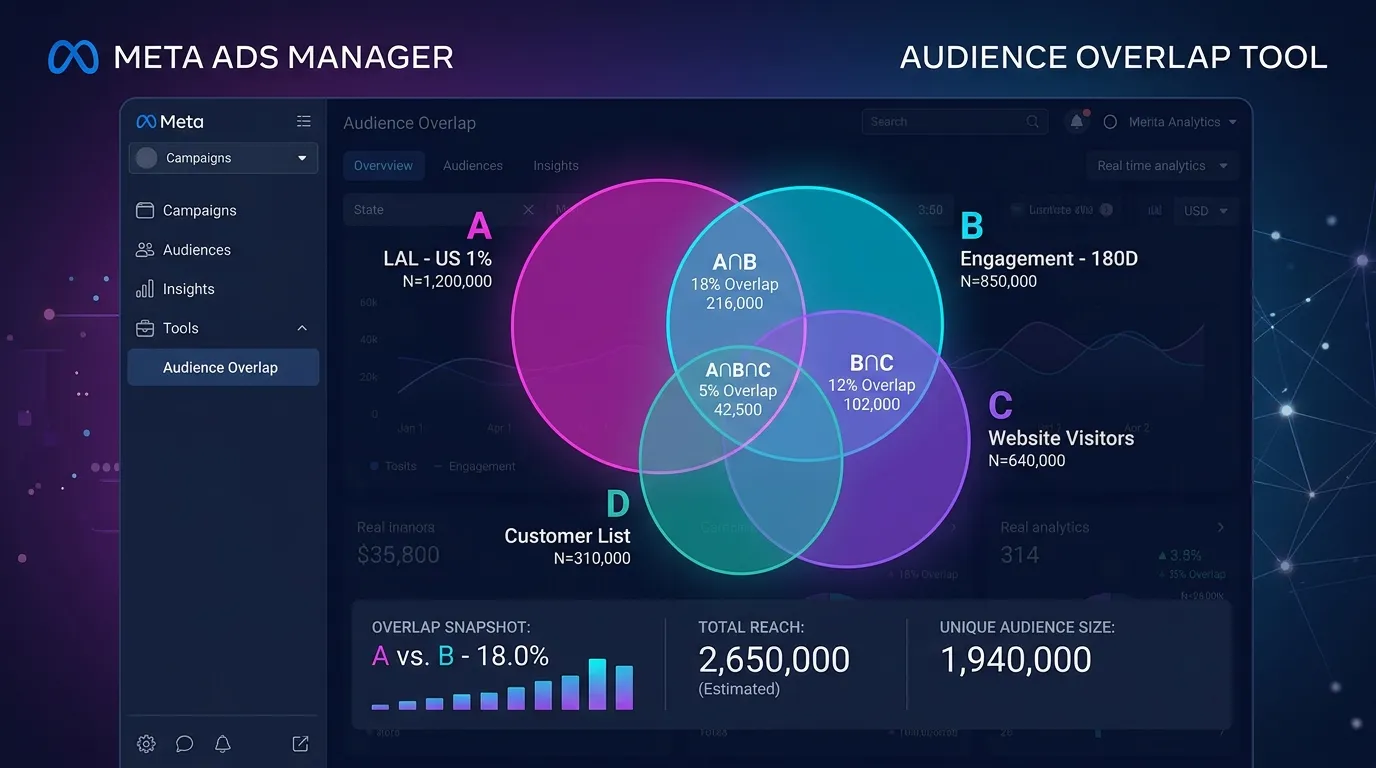
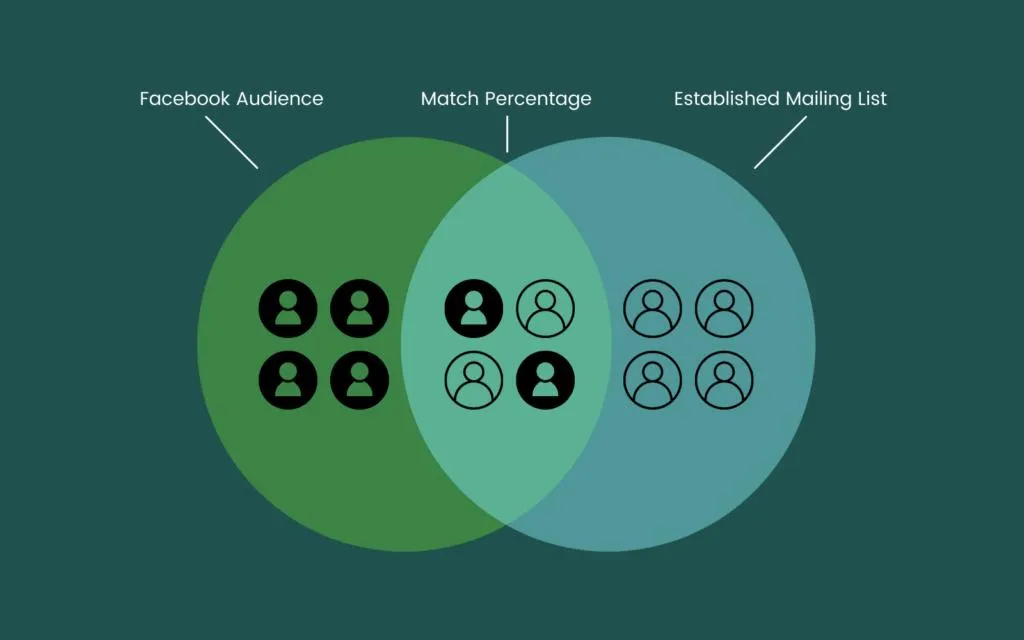
The Facebook Audience Overlap Tool is a feature in Meta Ads Manager that allows advertisers to compare custom audiences, saved audiences, and lookalike audiences. It shows the number of people who exist in two or more audiences. For example, if you have
- A website visitor audience
- A customer email list
- An Instagram engagement audience
Some users also appear in all three audiences. So it is important to use the overlap tool to identify the duplicates before running campaigns.
Types of Audiences You Can Compare
Here are the types of audiences you can identify and compare by using the overlap tool
Saved Audiences
It includes audiences built using the
- Age
- Location
- Gender
- Behaviors
- Interests
- Demographics
Custom Audiences
Custom audiences are created from your own data, like
- Facebook page engagement
- IG engagement
- Website visitors
- Customer email lists
- Mobile app users
- Video viewers
Lookalike Audiences
Lookalike Audiences are built from a source audience, such as your existing customers or website visitors. Comparing a Lookalike Audience with other audiences using the Audience Overlap Tool helps you see how much they overlap, allowing you to reduce audience duplication and improve campaign efficiency.
Why You Must Use the Audience Overlap Tool
The Audience Overlap tool is important to improve ad efficiency. It stops campaigns from competing for the same audience. Here's why you should use the Facebook Audience Overlap Tool
Reduce Ad frequency
When multiple ad sets target many of the same people, Meta allows only one ad set to compete for each overlapping user during an ad auction. The remaining ad sets rely more heavily on the users who are unique to their audiences.
For example, suppose:
- Ad Set B budget: $1,000/day
- Target audience: 100,000 people
- Audience overlap with Ad Set A: 70%
If Meta consistently selects Ad Set A to serve ads to the 70,000 overlapping users, Ad Set B primarily delivers ads to its remaining 30,000 unique users.
Although Ad Set B still has a $1,000 daily budget, it now has a much smaller audience to spend it on. To use the available budget, Meta may show the same ad to those 30,000 users multiple times.
Result: Ad frequency increases because the same people are exposed to your ads repeatedly. Over time, this can lead to ad fatigue, where users become less likely to engage with your ads, reducing campaign effectiveness.
Using the Facebook Audience Overlap Tool helps identify audiences that share a large number of users. By reducing overlap you can reach more unique people, keep ad frequency under control, and improve overall campaign performance.
Reduce Advertising Costs
As explained in the previous section, audience overlap can increase ad frequency because Meta repeatedly serves ads to a smaller pool of unique users. It can also increase your advertising costs.
For example, suppose:
- Ad Set B budget: $1,000/day
- Target audience: 100,000 people
- Audience overlap with Ad Set A: 70%
If Meta frequently serves ads from Ad Set A to the 70,000 overlapping users, Ad Set B is left competing for impressions from only its remaining 30,000 unique users.
With a much smaller audience, Meta still tries to spend the $1,000 daily budget, but it has far fewer new people to show your ads to. To achieve this, it may need to bid more aggressively to win ad placements for the remaining users. At the same time, repeatedly showing ads to the same people can reduce engagement because users are less likely to click or interact with ads they have already seen multiple times. Lower engagement signals can make your ads less competitive in the ad auction, further increasing the cost of reaching your audience.
Result: Your CPM (Cost per 1,000 Impressions) may increase because Meta has to compete harder to show your ads to a limited audience, making each impression more expensive.
Using the Facebook Audience Overlap Tool helps identify audiences that share many of the same users. By reducing overlap through audience exclusions, audience consolidation, or refined targeting, you can reach more unique people, reduce ad frequency, improve engagement, and help keep advertising costs under control.
Step by Step Guide to use Facebook Audience Overlap tool
Here are the steps you can follow to use the Facebook audience overlap tool
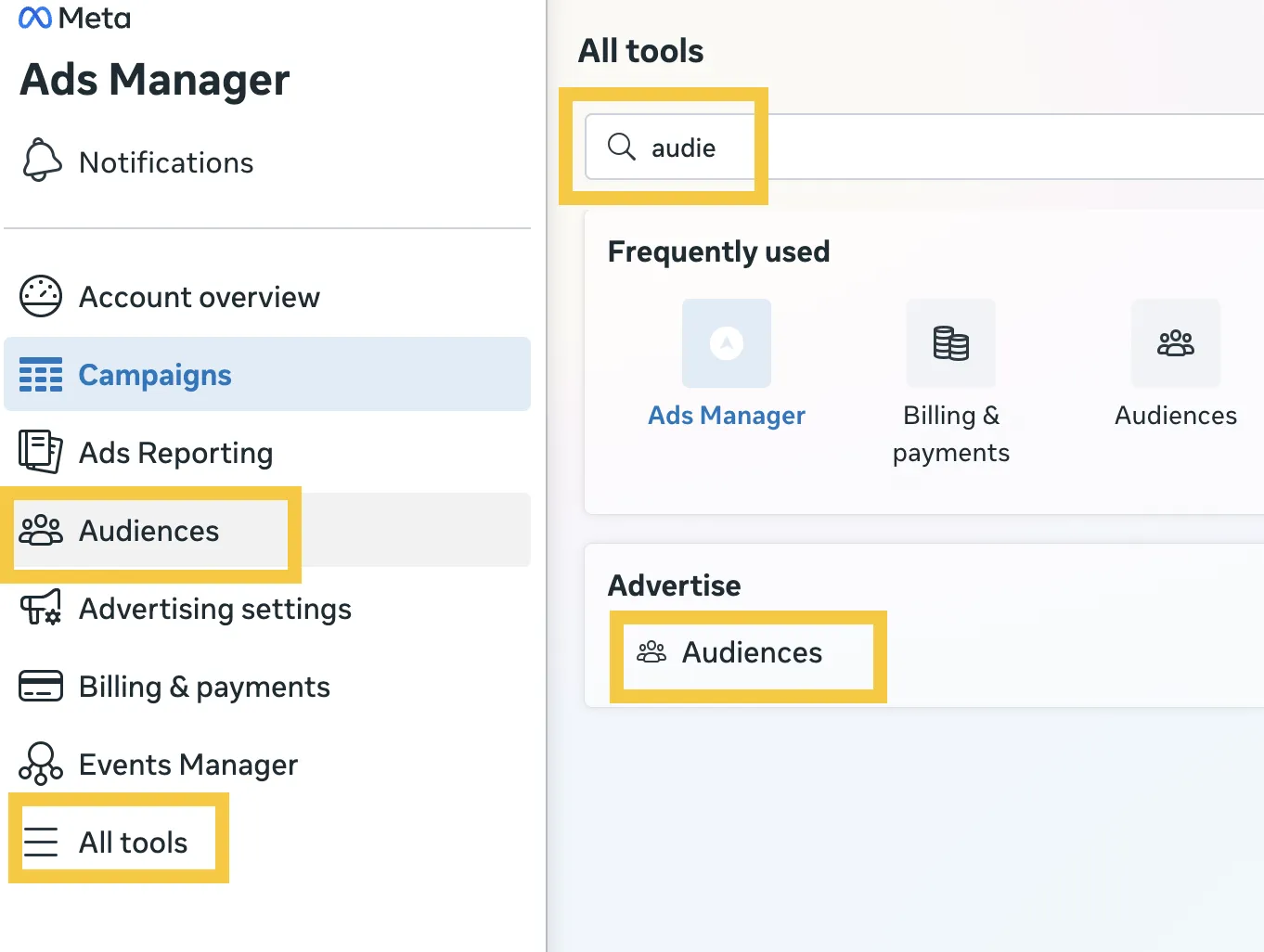
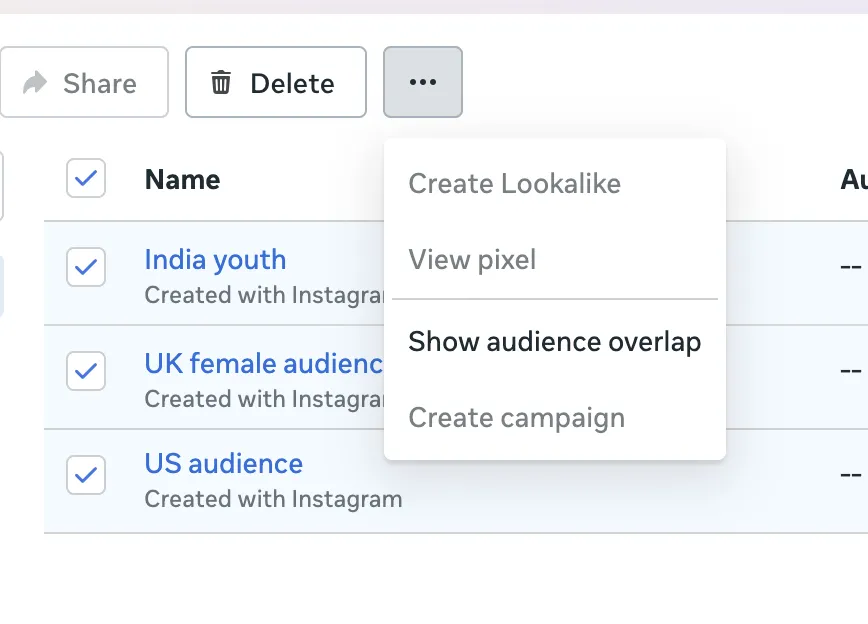
- Use the Facebook Ads Manager and tap on the 'Audience' tab in the left-hand menu. If this tab does not appear, then tap on the 'All tools' menu to find more options, and you will see 'Audiences' here.
- Now select up to five audiences you want to compare
- Click on the three-dot dropdown menu and choose ‘Show Audience Overlap.’
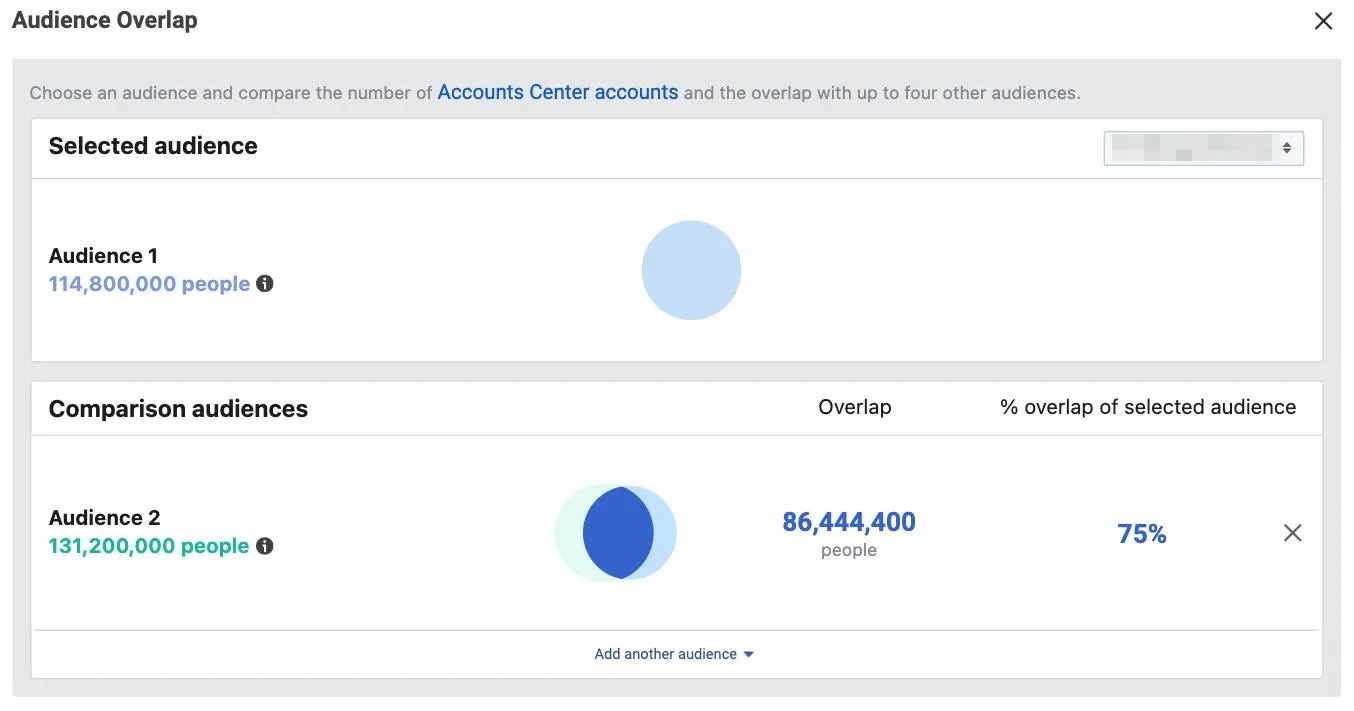
- Next, Facebook generates a Venn diagram showing the size of each audience and the percentage of overlap between them. It helps you understand how the audience interacts and find the areas for adjustment. For example, a significant overlap of 47% suggests refining your targeting strategy to bid against ads and reduce inefficiencies.
Example Scenario
Let us suppose the eCommerce store is targeting two audiences, those interested in Nordstrom (Audience A) and those interested in Topshop (Audience B).
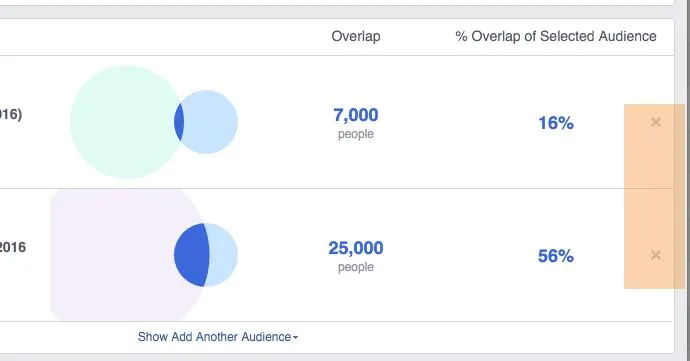
If Audience A has 100,000 people and Audience B has 1,000,000, with 50,000 people in both groups, you'll see
- Audience A overlaps with 50% of Audience B.
- On the other hand, Audience B overlaps with only 5% of Audience A.
It shows that ad sets aimed at Audience A may face delivery problems because of considerable overlap.
How to Prevent Audience Overlap Before It Starts
The best way to prevent audience overlap is by incorporating overlap prevention into your campaign structure from the beginning. Here's how you can prevent it

Use a Naming Convention That Flags Potential Overlap
Use a naming system for your audience that consists of the targeting criteria. When the audience name consists of the age range, exclusion status, and interest category, then you can easily identify the potential overlap.
Audit Audiences Monthly
Audience composition changes with time as user behavior changes, and Facebook updates interest categories. So using the overlap tool helps you catch new overlaps before they affect performance. It is important for brands that are scaling Facebook ads across different markets or products.
Centralize Audience Strategy Across Campaigns
When different team members or agencies create audiences independently, overlap becomes unavoidable.
Before assigning the campaign responsibilities, you should check that you correctly give someone access to Instagram Business account or add as admin and maintain permissions properly.
It is suggested to keep a shared audience library, and document which audiences are active in which campaigns solve this coordination challenge. If you're collaborating with a PPC agency (Pay-Per-Click agency), make sure they include audience overlap reports in their regular account reviews.
Conclusion
Facebook audience overlap management is important to keep your ad campaigns effective and avoid ad fatigue. By using this tool, you can make smart decisions about targeting strategies and ensure that your ads reach different segments of the audience. By taking a leading approach, you can optimize your campaigns, reduce CPA, and keep your audience engaged.
To get better campaign performance, you can combine the audience optimization with social media automation tools and cross-platform promotion strategy.
FAQs
What is the Facebook Audience Overlap Tool?
The Facebook Audience Overlap Tool helps advertisers compare custom, saved, and lookalike audiences to find shared users. It minimizes audience duplication, maximizes your ad spend, and boosts overall performance.
Why is audience overlap bad for Facebook Ads?
High audience overlap is not good for Facebook Ads because it increases advertising costs, causes ad fatigue, lowers your reach, and makes campaign performance harder to measure.
How much audience overlap is acceptable?
An audience overlap below 20% is acceptable. If the overlap exceeds 40%, then you should review your targeting strategy and set audience exclusions to avoid overlap.
Can I reduce audience overlap in Meta Ads Manager?
Yes, you can reduce the audience overlap in Meta ads manager by excluding existing customers, separate and retargeting audiences and consolidate similar audiences.
How often should I check audience overlap?
You should check the audience overlap before launching new campaigns and review it every few weeks. It is important to check it after new audiences or make targeting changes.